Showing posts with label online learning. Show all posts

Wednesday, September 2, 2015

Discussion Best Practices

Some of our peers in Colleague to Colleague have been involved in an awesome e-mail conversation concerning best practices for using Discussion Boards in online learning. I thought I would share some of the key insights:
  • Relevant context and applicability is the best way to spur student engagement.
  • Instructor presence is helpful (sometimes necessary), but a "light touch" rather than heavy interaction actually helps encourage dialogue.
  • Clearly defined expectations (typically either in the discussion prompt or the syllabus) about both what's required of students and what to expect from the instructor is helpful.
  • Discussions don't necessarily have to be graded, but a clear understanding of their value and contribution to the course (and to the grade if relevant) is essential.  Too meticulous of grading or rubric can discourage anything more than minimal participation.
  • Rubrics and stated guidelines for amount and quantity of participation can be helpful, but there's a risk of superficiality (posting for the grade, rather than the natural learning value) which can be detrimental to good discussion.
  • Having designated student moderators can give them ownership and encourage quality discussion.
  • For larger classes, groups and moderation is essential.
What are your thoughts?

Wednesday, May 13, 2015

Easy way to enliven your Instructional Material

Looking for a new way to present information to your students? Tired of the same ol' PowerPoint or Lecture Notes that you use over and over again? With FlipHTML5 you can still use your tried and true instructional material but present them more like an e-Book in your online course.

Step 1: Download for FREE the FlipHTML5 software at fliphtml5.com. You can download the program for free by selecting the appropriate buttons. Here is what the Free version provides:

  • FlipHtml5 Logo
  • 100 publications per month
  • Pre-designed templates
  • 10GB Host
  • Up to 50 MB per document
The various paid versions start at Pro Version for $15/month; Platinum Version (shown as the best deal) for $299/year or all the way to the Enterprise Version where you can pay a onetime fee of $999 and have it forever. I will demonstrate the FREE version!

Lecture Notes

Once you have the software downloaded, simply follow the instructions to add a new book and upload your PDF file so you can convert it to a digital book. Keep in mind your PDF must be less than 150 MB. Once you have uploaded your pdf, you can choose from a few templates and themes with the free version. This can then be embedded into a page in your online course!


There are a few fun ways your students can use the eBook. They can zoom in on a graphic to get a better look, they can print the book, and they can do a keyword search.

PowerPoint Presentations

If you want to convert your PowerPoint Presentations into an eBook, you will first want to change the orientation of your slides to Portrait. This will give it more of a book look. You may have to do some editing so that all your images and text are aligned correctly.

One more thing....you can place your e-books on different Bookcases in FlipHTML5 and you can actually embed an entire bookcase into your Canvas course! Your students can click on any of the eBooks in the bookshelf to view. (This is just an image of my bookshelf and is not active.)


Since you are embedding, any changes you make in the Flip HTML5 will change automatically in your course(s) as well. 

I bet you can think of lots of fun ways to incorporate this handy and FREE tool into your online or web enhanced course! Download the free software and create some eBooks! I hope you leave a comment letting us know how you and your students like this tool!

Monday, May 11, 2015

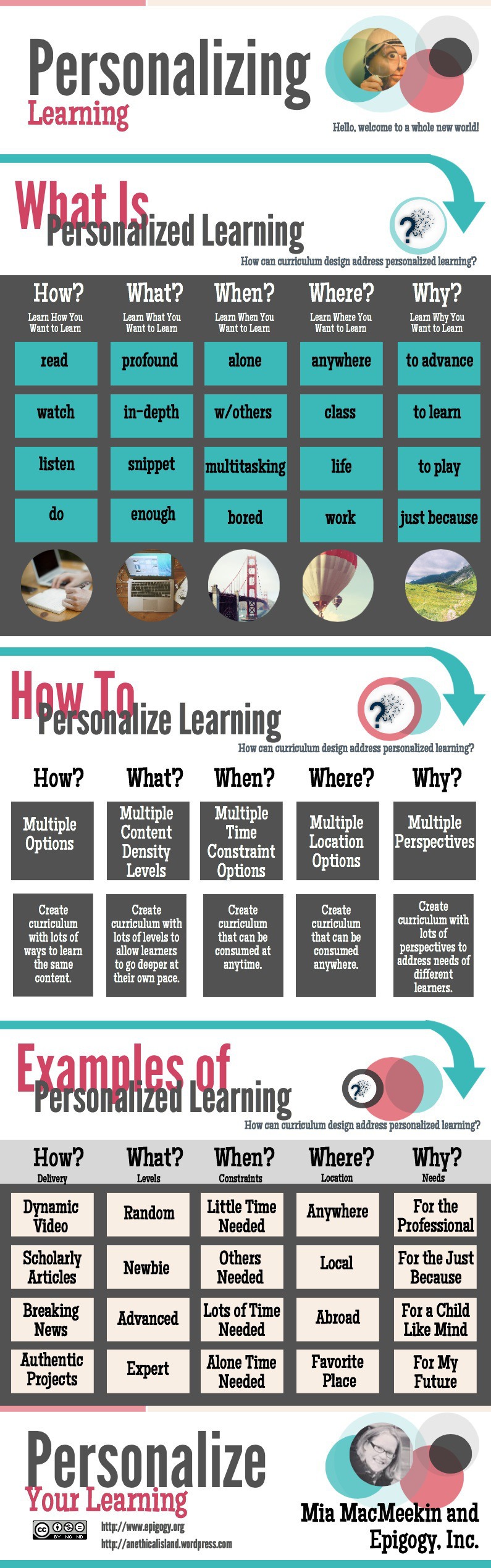
Personalized Learning: An Infographic

Here's a great infographic on personalizing learning! Enjoy!


  Personalizing Learning Infographic
Find more education infographics on e-Learning Infographics

Wednesday, November 12, 2014

Strategies for Student Success in Online Learning

What is the number one reason why students take courses online? I'm sure you have heard a lot of different reasons, but I bet the number one reason would be due to flexibility. That is the main reason why I like teaching online! I always said it's great to be able to teach in my PJs and bunny slippers with a glass of wine nearby!

However, that convenience can come with a price, right? How many students end up finding they are behind because they procrastinate or fail to really get engaged in the learning process?

The following lists the strategies found in Five-step Strategy for Student Success that you can share with your students and help them learn to be "self-directed".
  1. Read the syllabus (no kidding..right?) But more than that...the author provides details on how to make the syllabus work for the student!
  2. Plan weekly study times - it can be difficult juggling all the reading and posting and all those other assignments. Time management is critical!
  3. Log into the course home page at least 3 times a week - bet you didn't know that one!! 
  4. Ask Questions!!!! The stuff dreams are made of!
  5. Make connections with fellow students - it's all about building that learning community.
Take the time to read completely through this short article and you will also find some recommendations on how you, as the educator, can "give the learner the responsibility of learning".

These strategies all make perfect sense to us as educators, but we can't expect all our students to automatically understand and then eagerly embrace them. Ask your students to try just one or two and perhaps at the end of the semester, have them share how it went for them. Great extra credit opportunity! They could even put together a Pecha Kucha presentation about it!! But that's an earlier blog of mine.