As instructors, we often make the assumption that our students are mostly 'digital natives.' Anyone that has worked a college help desk. quickly comes to understand that access and/or familiarity with digital tools does not equate to a high level competences with said tools.
Here is a collection of websites that realistically address the use of Twitter. They also address the idea of taking charge of directing the use of this powerful social media tool.
Guide to Using Twitter in your Teaching Practice ; this is a blog post from KQED with emphasis on online safety tips, netiquette, reasons and suggestions for using Twitter, and most importantly Twitter 101, resources to quickly make instructors feel comfortable, even competent in using Twitter.
Best Practices and tips for the higher ed classroom, is less comprehensive but a great tone and aimed at getting you up to speed quickly.
Here is a 6 page downloadable PDF from Illinois Valley Community College that provides a quickstart guide to using Twitter.
A bunch of ideas for using Twitter are proposed here - some useful, some obvious, and some really intriguing.
Twitter may evolve into something totally different before long. Who knows? But the connections that are possible with social media (and the responsibilities) should resonate and strengthen your teaching for years to come.
Showing posts with label engagement. Show all posts
Showing posts with label engagement. Show all posts
Monday, November 16, 2015


Wednesday, October 14, 2015
Time Capsule Fun!
Here is a cool little website that can be used to engage your students in learning more about our society and how it has evolved over the years. Plus, it's a lot of fun!
dMarie Time Capsule allows you to enter any date and then choose what headlines, birthdays and other social aspects of society you wish to include. Or, you can choose to let the website pick for you. Check it out:
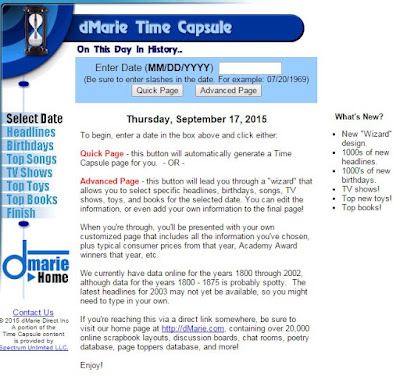
dMarie Time Capsule allows you to enter any date and then choose what headlines, birthdays and other social aspects of society you wish to include. Or, you can choose to let the website pick for you. Check it out:
Your students can have a lot of fun with this, instructors can tie social insight into lessons and it can be just plain fun! Click the image above to go to the website.
Thursday, August 13, 2015
6 Ideas for Video Projects for Students
Want More Student Engagement and Effort?
Here Are 6 Video Project Ideas For You

Creating videos can be a great way for students to both engage with the material and express their creativity. Students may also get excited about "storytelling" and sharing their work. Choosing the right type of project for a given assignment can be a bit tricky at first.
So, click here for an outline and suggested sites for tools, etc. and choose your adventure for lights, camera, action! :)
Monday, June 15, 2015
Glogster alternative
Glogster is free no More :(
Need an alternative?
If you used Glogster and would like a free alternative, you might try award-winning Biteslide
Biteslide looks a lot like Glogster. You can create what the site calls Slidebooks with images, video and text. Like the original education edition of Glogster, teachers can choose a free plan that allows them to have 30 student accounts and 3 projects. The site promises that this option is free forever. And, there are more plans are available at a price).

Give it a try and have fun out there! :)
Wednesday, May 13, 2015
Easy way to enliven your Instructional Material
Looking for a new way to present information to your students? Tired of the same ol' PowerPoint or Lecture Notes that you use over and over again? With FlipHTML5 you can still use your tried and true instructional material but present them more like an e-Book in your online course.
Step 1: Download for FREE the FlipHTML5 software at fliphtml5.com. You can download the program for free by selecting the appropriate buttons. Here is what the Free version provides:
There are a few fun ways your students can use the eBook. They can zoom in on a graphic to get a better look, they can print the book, and they can do a keyword search.
Step 1: Download for FREE the FlipHTML5 software at fliphtml5.com. You can download the program for free by selecting the appropriate buttons. Here is what the Free version provides:
- FlipHtml5 Logo
- 100 publications per month
- Pre-designed templates
- 10GB Host
- Up to 50 MB per document
The various paid versions start at Pro Version for $15/month; Platinum Version (shown as the best deal) for $299/year or all the way to the Enterprise Version where you can pay a onetime fee of $999 and have it forever. I will demonstrate the FREE version!
Lecture Notes
Once you have the software downloaded, simply follow the instructions to add a new book and upload your PDF file so you can convert it to a digital book. Keep in mind your PDF must be less than 150 MB. Once you have uploaded your pdf, you can choose from a few templates and themes with the free version. This can then be embedded into a page in your online course!
There are a few fun ways your students can use the eBook. They can zoom in on a graphic to get a better look, they can print the book, and they can do a keyword search.
PowerPoint Presentations
If you want to convert your PowerPoint Presentations into an eBook, you will first want to change the orientation of your slides to Portrait. This will give it more of a book look. You may have to do some editing so that all your images and text are aligned correctly.
One more thing....you can place your e-books on different Bookcases in FlipHTML5 and you can actually embed an entire bookcase into your Canvas course! Your students can click on any of the eBooks in the bookshelf to view. (This is just an image of my bookshelf and is not active.)

One more thing....you can place your e-books on different Bookcases in FlipHTML5 and you can actually embed an entire bookcase into your Canvas course! Your students can click on any of the eBooks in the bookshelf to view. (This is just an image of my bookshelf and is not active.)
Since you are embedding, any changes you make in the Flip HTML5 will change automatically in your course(s) as well.
I bet you can think of lots of fun ways to incorporate this handy and FREE tool into your online or web enhanced course! Download the free software and create some eBooks! I hope you leave a comment letting us know how you and your students like this tool!
Monday, May 4, 2015
You Might Not Believe What a Catchy Title Can Do...
How to Create Effective and Engaging "Headlines" for Notes and Lectures
Though lectures and notes are not exactly "presentations. Wouldn't it help students engage if the title were catchy and even played to the "What good is this in real life" issue?
Regardless, wouldn't thinking things through from this angle help us teachers have a better target for our lectures and notes?
This is how Powtoon's blog is helping with this idea. (Examples below)
Winning Headline Formulas: The 5 Principles of an Effective Headline
1. Address Your Specific Audience (Being vague or general = boring university)
2. Highlight the Specific Benefit or Outcome They Desire
3. Highlight the Specific Pain They Most Want to Avoid
4. Create Curiosity
5. Add Urgency

From the blog: "The term [chosen] for ‘Niche’ or ‘Audience’ is ‘Avatar’. An Avatar means the identity of your target market or tribe. So let’s say your tribe are university students – then anytime you see ‘Avatar’ below, just put in the title of your Avatar. That could be ‘University Students’ or even mention the specific university you’re addressing. Of course, this applies to ANY tribe – and it absolutely applies to YOUR tribe.
Caveat: these are not black and white formulas, so feel free to play around a little. You might want to add certain elements within some of the formulas. The main thing is being specific to your tribe and leveraging the 5 principles above.
Remember, the secret to making your headlines ridiculously attractive is by deeply understanding what your tribe WANTS. The more clarity you have on what your audience wants, the easier it’ll be for you to use these formulas with power.
Also – you can use some of these together. One of the formulas might be a great Headline and another would be a perfect supporting Headline for you. Mix it up!
As you’ll see below, for some of these headline formulas I gave specific examples. Now as a fun bonus – I’m here to help you get the most out of this list. So if you’d like some extra help making your headline irresistibly awesome – choose one of the formulas below, use it to craft your own headline and write it in the comment section below. If you’re curious how to make it even more awesome – just ask, and I’ll help you make it even better."
Introducing: The 91 Awesome Headline Formulas
1) A Little Mistake That Cost a [Title of Avatar] [Painful Loss] a [Time] (i.e ‘A Little Mistake That Cost a SaaS CEO $50,000 a Month’)
2) [Gain] Hiding In Your [Avatar’s Location] (i.e ’5 Optimization Secrets Hiding In Your YouTube Analytics’)
3) How I Made a [Gain] With a [Simple/Crazy/Wild Idea] (i.e ‘How I Got My Newborn to Sleep With a Cherry Red Gibson Guitar’)
4) Are You Still [Painful/Embarrassing Things]? (i.e ‘Are You Still Biting Your Nails?’)
5) There Are Only/Always [Number] Types of [Avatar] You Ever Want To [Result] – Which Group Are You In? (i.e ‘There Are Only 4 Types of Employees You Ever Want To Hire – Which Group Are Your Employees In?’)
6) To People Who Want To [Avatar’s Action] – but Can’t Get Started (i.e ‘To Young Mothers Who Want To Have Their Own Business While Raising Their Kids – But Can’t Get Started’)
7) )The Crimes We Commit Against Our [Avatar] (i.e ‘The Food Crimes We Commit Against Our Body’ or ‘The Creativity Crimes We Commit Against Our Employees’)
8) These [Number] of [Avatar] Messed With [Product], See What Happened (i.e ‘These 5 New Piano Players Messed With Piano-Hero, See What Happened’)
9) The Death of [Avatar's Niche] (i.e ‘The Death of Old School Social Media’)
10) How One Word Can Get You [Avatar's Worry] (i.e ‘How One Word Can Get You Fired’)
Subscribe to:
Posts (Atom)