I am not necessarily a fan of free tech tools. Too often they are limited in ability, poorly supported, or trials to entice you to buy a pricier item. I take my job seriously and if I need good tools, I want them to work properly. If I have to pay for them, then it is because I value them and their developers.
That said, I checked out the website for the proposed speaker for SIDLIT 2016. Richard Byrne's Free Technology for Teachers is a blog that hits the trifecta of being well-written, well-designed and up-to-date. The content targets a WIDE range of subjects and ages as well. As who is to say that an item targeted at high schools won't work for an incoming college freshman?
I also appreciate his style - a trendy, breezy one, but one that works well for online readers, using lots of short lists and chunked paragraphs. For a busy professional who wants to scan headings before digging deeper - good reading.
Put it on a feed of your choice (RSS, Pinterest, Google+ etc) or do the old-fashioned thing and bookmark the site. Regardless, this is a site that instructors from all disciplines can dip into to find that tool to make your life and those of your students a bit smoother.
Showing posts with label free. Show all posts
Showing posts with label free. Show all posts
Monday, March 28, 2016


Monday, February 15, 2016
Hear this
Free Sound Effects!
I was browsing some of my old Bookmarks and found this site that has free sound effects. The company appears to be a professional production company that has been around for a while.
There is quite a range of effects, categories, and formats. You are no longer stuck with whatever the tool you are using has to offer, or spending a lot of time surfing for the sound of a magic wand, or someone clearing their throat, or an inkjet printer, or falling coins...
I was browsing some of my old Bookmarks and found this site that has free sound effects. The company appears to be a professional production company that has been around for a while.
There is quite a range of effects, categories, and formats. You are no longer stuck with whatever the tool you are using has to offer, or spending a lot of time surfing for the sound of a magic wand, or someone clearing their throat, or an inkjet printer, or falling coins...
Wednesday, April 29, 2015
Wordle be gone?
Wordle has been a popular way to illustrate an idea with words for several years. Butler Online instructors who have taken INTON may remember using it as part of their final project. They may possibly include its use in their own courses as well.
Sadly, it appears that this free tool is longer supported and may disappear altogether. Never fear, there are a number of other tools that produce similar results. Check these out if you are a Wordle fan or just curious - and let us know what you think.
Monday, March 2, 2015
Snipping Tool
For years Mac users have used the built in tool Grab for capturing screen shots and portions of screens.
With Vista and Windows 7, PC users now have their very own tool (not just Print Screen) to capture a screen or portion of a screen without purchasing TechSmith's Snagit.
Don't get me wrong, I love Snagit. Techsmith has expanded this application, to make it well worth its 49.95 price tag. But sometimes you aren't at your own computer, or you need to coax a student through an issue.
The interface of Snipping Tool is fairly straightforward, and allows users to save in the most common graphic formats.
Snipping Tool should already be installed on the PC with Windows 7 or 8. To locate, go to Start and choose All Programs. If someone (you or someone who needs help) can't find the tool, on their system, there are a number of sites including: http://www.techradar.com/downloads/snipping-tool-plus
With Vista and Windows 7, PC users now have their very own tool (not just Print Screen) to capture a screen or portion of a screen without purchasing TechSmith's Snagit.
Don't get me wrong, I love Snagit. Techsmith has expanded this application, to make it well worth its 49.95 price tag. But sometimes you aren't at your own computer, or you need to coax a student through an issue.
The interface of Snipping Tool is fairly straightforward, and allows users to save in the most common graphic formats.
Snipping Tool should already be installed on the PC with Windows 7 or 8. To locate, go to Start and choose All Programs. If someone (you or someone who needs help) can't find the tool, on their system, there are a number of sites including: http://www.techradar.com/downloads/snipping-tool-plus
Wednesday, June 11, 2014
Free use of Art/Artifact Images
Would you like to use images with the assurance that you have the rights to use them? Take a look at Museum of New Zealand website. They over over 30,000 images of art and artifacts that you can download and re-use for free.
When you can search for an image, I would suggest making sure you click the option to search for only downloadable images. This will save you from scrolling through a lot of "Image not available" pages!

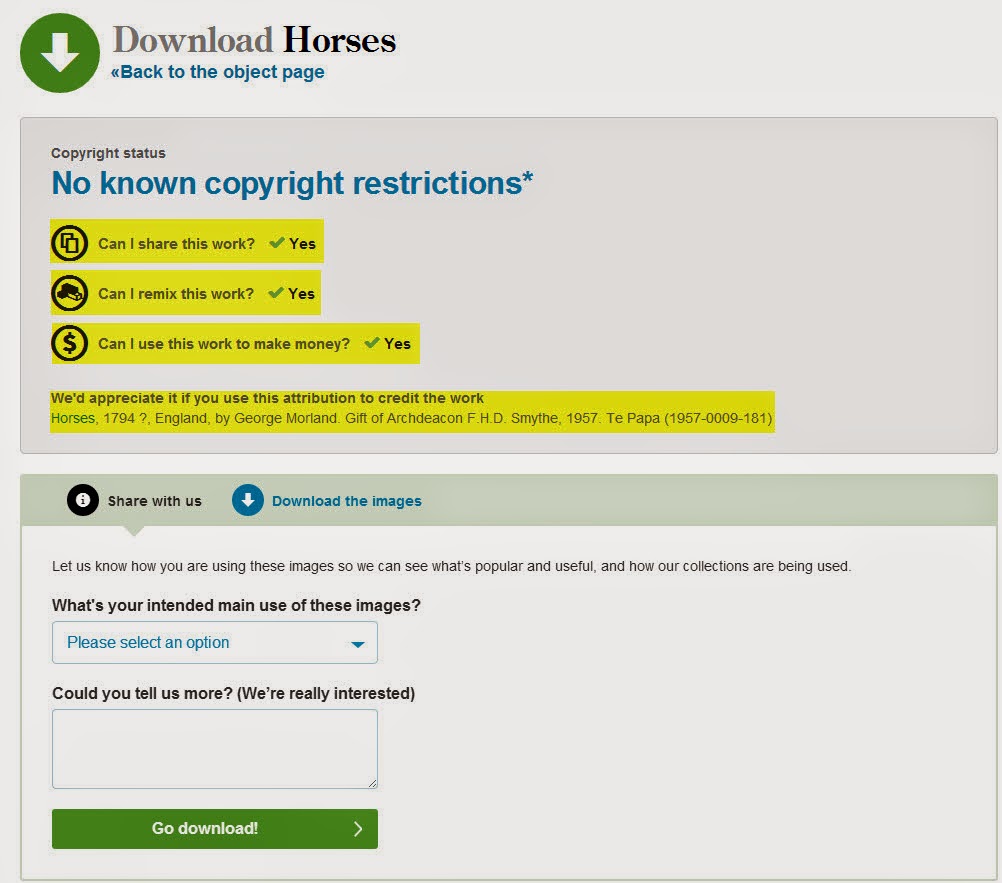
Once you find the image you want to use and click on it, you will see information about the image such as medium, materials, classification, etc. You can find out more about how an image is licensed by clicking on the download button.....

When you can search for an image, I would suggest making sure you click the option to search for only downloadable images. This will save you from scrolling through a lot of "Image not available" pages!
Once you find the image you want to use and click on it, you will see information about the image such as medium, materials, classification, etc. You can find out more about how an image is licensed by clicking on the download button.....
......which will take you to the next page where you can review the copyright information and attribution information.
You now have an image you can insert into a powerpoint or even a page in Canvas. The website is collections.tepapa.govt.nz. Check it out by clicking on this link to go directly to the website: Museum of New Zealand Online Collections.
Wednesday, April 10, 2013
SoundGator
It is becoming so easy to create a video online and post to your blog or course. But, no video project is complete without the addition of sound effects. Sounds add a whole new dimension to your videos. SoundGator is great site to locate and download the perfect sound effect - and, as most of the resources we share here - it is completely free. You do have to register but that is quick and painless. Give it a try.
Friday, January 11, 2013
eQuizShow
Back in my public high school teaching days, my students enjoyed reviewing for tests Jeopardy-style. I used a neat PowerPoint template and spent plenty of time building questions and answers. It was effective for the students but a bit time consuming to create. Henry Wilson, a junior year high school student from New York City, has developed a free online tool called eQuizShow. The easy-to-use tool generates Jeopardy-style games online with no need to download or upload PowerPoint files. Check out the eQuizShow gallery to use a quiz that has already been created or just to get some good ideas for your game. Enjoy!
Wednesday, August 15, 2012
The Perpetual Learner
Today, the Huffington Post posted an article from the blog of Tom Teicholz about the ways Online Learning is empowering people to become perpetual learners at any age. I love the idea of this, not just because I am admittedly biased, but because it opens so many possibilities for so many. Personally, I would love to take more Art Appreciation courses for fun. I teach business courses, which I love, but a big reason for that is that I have no apparent artistic skills. But I loved my Art History courses in college and go to every major art museum in range when I travel. I also plan to brush up on some of my outdated technical skills since every job needs them these days. Now that I work at Butler Online and get to see all that is available to me, I have started a little "bucket list" of courses I would love to take.
What courses do you want to take?
What courses do you want to take?
Thursday, May 31, 2012
Web 2.0 Research Tools: A Quick Guide
You may wish to share some of the tools in the book, Web 2.0 Research Tools: A Quick Guide, with your students. It is packed with Web 2.0 tools, suggestions for their use (especially for research), and clear instructions for beginning users. We have presented many of the tools in this blog but Web 2.0 Research Tools: A Quick Guide is a great compilation and does include some tools we have not mentioned. The tutorials are well made and quite useful. A PDF version of the book is available for free download.
Wednesday, May 9, 2012
Secret cloud space
Free cloud spaces are very popular these days. No more jump drives to misplace, you can access your photos, music, documents from anywhere as long as you are connected to the Internet.
You may already have a 5GB account that you may not know about. Amazon offer 5GB of free storage with every Amazon account. You can upload photos, music, video or documents without having to remember one more password. For more details, log on to your Amazon account, click on the Your Account link and scroll down to the Digital Content section of the page. Now if you can only resist adding a few more things to your Shopping Cart while you are at it.
You may already have a 5GB account that you may not know about. Amazon offer 5GB of free storage with every Amazon account. You can upload photos, music, video or documents without having to remember one more password. For more details, log on to your Amazon account, click on the Your Account link and scroll down to the Digital Content section of the page. Now if you can only resist adding a few more things to your Shopping Cart while you are at it.
Thursday, April 19, 2012
Google Education on Air Conference - free and online
We received this invitation via email today and thought you might want to attend some of the sessions. They are free and online!
You're invited to

We are pleased to announce Education On Air, a free online edtech conference. This conference is convened by Google and features over 50 educators hosting 46 Hangouts of professional development.
The Hangouts will be live streamed on Google+ on the page of each presenter. As you watch, you can submit questions & comments live to the educators.
Visit the website today to review the sessions and add them to your calendar. Sign up for Google+ at no charge by visiting www.google.com/+
We hope you can participate!
Regards,
Tia Lendo, Google in Education team
 |
We are pleased to announce Education On Air, a free online edtech conference. This conference is convened by Google and features over 50 educators hosting 46 Hangouts of professional development.
The Hangouts will be live streamed on Google+ on the page of each presenter. As you watch, you can submit questions & comments live to the educators.
Visit the website today to review the sessions and add them to your calendar. Sign up for Google+ at no charge by visiting www.google.com/+
We hope you can participate!
Regards,
Tia Lendo, Google in Education team
| Date and Time. Wednesday, May 2nd Start: 9AM PT / 11AM CT / 12PM ET End: 7PM PT / 9PM CT / 10PM ET | Session Themes. Hot Topics in EdTech Instructional & Assessment Tools Google Apps Communicate, Connect, and Share Harnessing the Web Chromebooks for Education |
Monday, March 26, 2012
Yodio!
Yodio is a free tool that records words and visuals for future playback. As instructors, we can use it to explain a difficult concept or one with unusual pronunciations so the students can play it as many times as they’d like until they are ready to move on. For the students, we could have them explain what they read or discuss their opinions on a topic, then send us the link so we could assess them in a way outside traditional evaluation methods. What a great way to connect using something outside of the normal procedures! Give it a try and let us know what you think!
Below is an example of a student Yodio submission. Press the play button to hear what she has to say!
Thursday, March 22, 2012
Put a CORK in it!
We’ve all read about the importance of group work and collaboration but sometimes getting things started is part of the challenge! One way to get students to form teams is to use corkboard.me (www.corkboard.me). You can use this tool to facilitate a brainstorming session - my example is on “healthy lifestyle choices”. They can add suggested topics to your corkboard (anonymously) then when you’re ready, they can sign up for whichever topic they want to work on.
I’ve also seen it used as a way for students to introduce themselves to the class. Play with mine and see if it might be useful in your class! http://corkboard.me/oCgczOvjhd
Friday, March 16, 2012
Time Toast
If you ever need to show a timeline or have your students create one, this tool is for you! It’s free and allows you quickly and easily create a timeline on a topic you teach. Try it out and let us know what you think! Meanwhile, check this one out on the Beatles!
Tuesday, March 13, 2012
Taking a Poll...
A few of us went to an E-Learning conference last week and picked up some new cool *free* tools to share with you! In many of the ones I attended, they took polls to gauge the audience (“what education level are you representing?”), check for comprehension &/or relevance (“do you feel like you could use this tool in your class?”), or provide a quick mental break (“what is your favorite candy bar?”) At first, I was the girl in the back bumbling for my phone, trying to be the first one to text my answer and see it appear on the projector, but as it continued, I realized the benefit these would serve in many classrooms! The kids want to use their phones anyway, why not turn them into an engaging teaching tool? Maybe start your class with a question to assess whether they’ve read the assigned material? Or do one halfway through to see if they’re following you? It’s easy and fun, and might be just what you’re looking for to freshen up your next meeting, whether it’s online or face-to-face! Polls can be taken via email, text or even tweet and can be embedded into a PowerPoint, ANGEL, or a variety of other options. Check them out (flisti & polleverywhere are two I saw) and let us know if we can help!
Monday, February 27, 2012
Online Resources for YOU!
80 Online Tools, References, and Resources
We all know that teachers are always looking for tools, references, and resources for classrooms. Well, here's 80 "must see" trial, free, and paid websites recommended by Edutopia community members. Keep this list in your back pocket! It might come in handy. (The list is not ranked and listed in any order.) =)
We all know that teachers are always looking for tools, references, and resources for classrooms. Well, here's 80 "must see" trial, free, and paid websites recommended by Edutopia community members. Keep this list in your back pocket! It might come in handy. (The list is not ranked and listed in any order.) =)
Friday, January 6, 2012
Sci2ools - Free Online Productivity Tools - Sciweavers
The Sci2ools site houses a number of useful free tools, as noted in the graphic of their site toolbar below. The i2Symbol tool features 35 categories of symbols besides those from other languages.
Included are 3 categories of math symbols such as:
≦≧≭∦∛∔⋊⋈ - Don't ask me what any of these mean!
Music symbols include: ♩♪♫♬♭♮♯
You can even get the HTML code for the symbols if you wish.
You can convert text to an image or extract text from an image, convert a web page to an image or pdf, merge pdf files, extract pdf files, etc., etc.
This site is well worth a quick - ⍥Ի η⍥☂ ṡ⍥ ҩυїḉк - look.
Sci2ools - Free Online Productivity Tools - Sciweavers

Included are 3 categories of math symbols such as:
≦≧≭∦∛∔⋊⋈ - Don't ask me what any of these mean!
Music symbols include: ♩♪♫♬♭♮♯
You can even get the HTML code for the symbols if you wish.
You can convert text to an image or extract text from an image, convert a web page to an image or pdf, merge pdf files, extract pdf files, etc., etc.
This site is well worth a quick - ⍥Ի η⍥☂ ṡ⍥ ҩυїḉк - look.
Sci2ools - Free Online Productivity Tools - Sciweavers
Friday, November 18, 2011
Easily Create your own Graphics
This post is from Elizabeth Luzar, Butler nursing instructor. Thanks for the valuable tips, Elizabeth.
"I follow the Articulate blog --- not so much for Articulate itself, but Tom has some great ideas to make e-learning tutorials better.
"I follow the Articulate blog --- not so much for Articulate itself, but Tom has some great ideas to make e-learning tutorials better.
One of the big things I have learned from his blog is about graphics. Yesterday I made two graphics (each took about 20 minutes) to illustrate some pharmacokinetics concepts.
I did them in PowerPoint. I made a slide with what I wanted the graphic to look like, grouped it and then saved it as a picture (jpg) that I could import into my ANGEL page".
This is the graphic Elizabeth created:

"The specific blog is:
http://www.articulate.com/rapid-elearning/7-secrets-to-getting-the-graphics-you-need-for-rapid-e-learning/ . Scroll down to Customize Clip Art to Meet your Needs. There are 3 links after his discussion that take you to previous blog entries to show you how to do it".
 | I decided Elizabeth didn't get to have all the fun so I made the graphic on the left to demonstrate just how some of our students might be feeling about now. |

Friday, November 4, 2011
50 GB of Cloud Storage - Free!
Box.net is "giving away 50 GB of free storage to anyone who uses a free Box Personal account on an iOS device. That’s right, it’s 50 GB in the cloud completely free, forever. Your 50 GB of storage isn’t just limited to your mobile device – you get it anywhere you use your Box account, like on your laptop at home or your desktop at the office.
This promotion only runs for 50 days, so get your free space in the cloud by following these steps:- Visit the app store and download the Box app for your iPhone, iPad or iPod touch
- Log in to your account or register for a new one directly from the app
- Start sharing and collaborating in the cloud" (originally posted on the Inside the Box blog).
This offer began Friday, October 14th, 2011 at 12:01 am Pacific Standard time so the clock is ticking. Go get yours now.
Tuesday, September 20, 2011
Notes in the Cloud
 Do you lecture and encourage your students to take notes? Penzu might be the tool for your class! It's promoted as a secure, cloud-based, online journaling tool but since many of our students are toting around a laptop/netbook anyway, I think it'd be great for students to use for taking class notes too! The basic version is free, it date stamps each entry, and you can organize and delete your notes at will. Suggest this the next time your student says that the notes she took in your class are on her (lost) flash drive! Check it out at www.penzu.com and let us know what you think!
Subscribe to:
Posts (Atom)